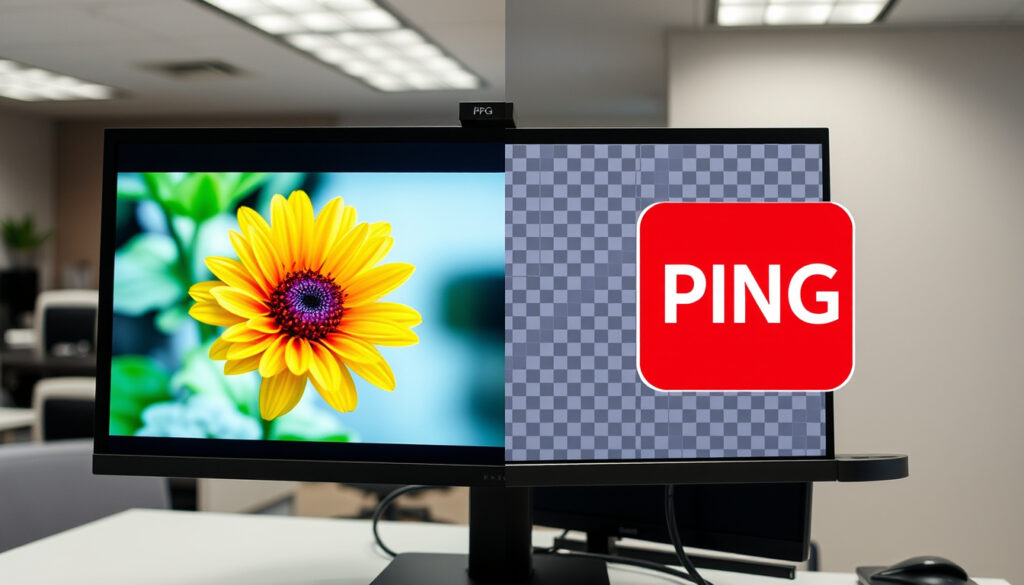
What Is a JPG vs PNG – Compression, Transparency and Best Uses
JPEG and PNG represent two fundamentally different approaches to digital image storage. Understanding their core distinctions helps creators, developers, and general users make informed decisions about which format serves their specific needs best.
JPEG, derived from the Joint Photographic Experts Group standard, has dominated digital photography since the early 1990s. PNG emerged several years later as a patent-free alternative offering lossless compression and transparency support. Both formats now enjoy universal browser support, yet they serve distinctly different purposes in modern web and design workflows.
This comparison examines compression methods, file sizes, quality preservation, transparency capabilities, and practical use cases to determine which format works best for different scenarios.
What Is the Difference Between JPG and PNG?
The fundamental distinction between these formats lies in their compression approaches. JPEG employs lossy compression, permanently discarding image data to achieve smaller file sizes. PNG uses lossless compression, preserving every piece of original data while still achieving reasonable compression ratios.
Each time you edit and resave a JPEG, additional data disappears in what professionals call “generation loss.” PNG files, by contrast, maintain perfect quality across unlimited editing cycles because no data is ever discarded—only reorganized for efficiency.
Key Insights to Remember
- JPEG can compress images to roughly 5% of their original size without catastrophic visible loss, making it ideal for web delivery of photographic content.
- PNG’s lossless nature makes it essential for images requiring sharp text, precise lines, or transparency overlays.
- JPEG artifacts become increasingly visible around sharp edges and high-contrast boundaries when compression levels increase.
- PNG supports full alpha channel transparency, allowing pixels to exist at varying levels of opacity rather than simply on or off.
- For web optimization in 2025, many developers now consider WebP or AVIF alternatives alongside these traditional formats.
- Browser support for both formats remains universal across all major browsers and mobile devices.
Quick Reference: JPG vs PNG at a Glance
| Aspect | JPG | PNG |
|---|---|---|
| Full Name | Joint Photographic Experts Group | Portable Network Graphics |
| Extension | .jpg, .jpeg | .png |
| Compression Type | Lossy | Lossless |
| Maximum Colors | 16.7 million (24-bit) | 281 trillion (48-bit) |
| Transparency | None | Full alpha channel |
| Animation | No | No (APNG extension exists) |
| Best Use Case | Digital photographs | Graphics, logos, screenshots |
| Editing Tolerance | Limited (generation loss) | Unlimited |
| Browser Support | Universal | Universal |
| Typical File Ratio | 10:1 to 20:1 vs. uncompressed | 2:1 to 3:1 vs. uncompressed |
When Should You Use JPG vs PNG?
Choosing between these formats depends primarily on the nature of your image content and your specific requirements for quality, file size, and editing flexibility.
Choosing JPEG for Photographs
Digital photographs represent the natural home for JPEG format. The human eye struggles to perceive the subtle color variations that JPEG discards during compression, so photographs typically compress to 10-20% of their original size with minimal perceptible quality loss. This efficiency translates directly to faster page load times, reduced storage costs, and smoother user experiences on bandwidth-constrained connections.
JPEG quality settings typically range from 0 to 100, with 80-90 representing a common balance between visual fidelity and file size. Professional photographers often export at 95-100 for archival purposes, accepting larger files in exchange for maximum detail preservation.
Choosing PNG for Graphics and Design Work
Graphics containing sharp lines, text, large areas of solid color, or transparency requirements demand PNG format. JPEG compression produces visible artifacts—blocky patterns and color bleeding—around high-contrast edges in graphic content. These artifacts prove particularly noticeable when rendering text, making JPEG unsuitable for infographics, screenshots with overlaid text, or any content where precision matters.
PNG’s support for alpha channel transparency allows partial opacity levels, enabling smooth anti-aliasing against any background color. This capability makes PNG the standard choice for logos, icons, buttons, and any graphical elements meant to overlay onto variable backgrounds.
Web Optimization Considerations
Modern web workflows often incorporate both formats strategically. A typical e-commerce product page might use JPEG for product photography to balance visual appeal against loading speed, while using PNG for badges, promotional banners, and interface elements requiring transparency or sharp text rendering.
While JPEG typically produces smaller files for photographs, PNG sometimes compresses better for simple graphics. Testing both formats for any specific image helps determine optimal choices for your particular content mix.
Does PNG Support Transparency and Why Are Files Larger?
PNG fully supports transparency through alpha channels, a capability that fundamentally differentiates it from JPEG. An alpha channel stores an opacity value for each pixel, ranging from completely transparent to completely opaque, with any intermediate value possible. This granularity enables smooth anti-aliasing and realistic compositing of graphical elements over any background.
JPEG lacks any transparency mechanism—every pixel must be either fully opaque or handled through workarounds like layering over solid-colored backgrounds. This limitation makes JPEG unsuitable for any design work requiring overlay capability.
Why PNG Files Tend to Be Larger
PNG’s larger file sizes relative to JPEG for photographic content result from its lossless compression approach and greater color depth capabilities. PNG supports up to 48-bit color plus alpha information, while JPEG typically operates at 24-bit. The additional data required to store alpha channel information and preserve all original color variations contributes significantly to file size differences.
Additionally, PNG’s compression algorithm favors repetition and solid color regions—characteristics common in graphics but less prevalent in photographs. The same algorithmic efficiency that makes PNG excellent for line art and text becomes less effective when compressing the complex, randomized patterns typical of photographic images.
JPEG’s lossy approach discards what the compression algorithm determines to be imperceptible color variations, dramatically reducing data requirements. A photograph compressed to 5% of its original size may lose only marginal perceivable detail, whereas the same image saved as PNG might require 50% or more of the original uncompressed size.
For projects combining both format types, consider organizing files by format to simplify workflow. Tools like TinyPNG can reduce PNG file sizes through additional optimization without affecting transparency.
Is PNG Better Quality Than JPG?
Quality comparison between PNG and JPEG depends entirely on context and the specific images being compared. For graphic content—logos, screenshots, diagrams—PNG produces definitively superior results with sharp edges, clean colors, and no compression artifacts. For photographs viewed at normal sizes, JPEG quality at typical settings proves difficult to distinguish from lossless alternatives.
Understanding Generation Loss in JPEG
Each successive edit-and-save cycle degrades a JPEG file further. This cumulative quality loss, called generation loss, means that a photograph edited multiple times over weeks or months may show significantly more artifacts than the same image saved only once. Professionals handling client work often maintain lossless originals and export compressed versions only for final delivery.
PNG files maintain identical quality through unlimited editing cycles. An image edited in Photoshop, saved, closed, reopened, and resaved retains exactly the same data after each operation. This characteristic proves essential for design work where files may undergo numerous revisions during development.
Viewing Conditions and Perceived Quality
Display resolution, viewing distance, and image size all influence perceived quality differences. At typical web viewing sizes on modern high-density displays, a photograph saved at 85% JPEG quality appears nearly identical to its lossless PNG equivalent. The artifacts become visible primarily when examining images at full resolution, printing at large sizes, or viewing on calibrated professional displays.
For archival purposes or professional print work, lossless formats like PNG preserve maximum flexibility for future editing and cropping. The larger storage requirements often prove worthwhile when image quality cannot be compromised.
How to Convert Between JPG and PNG
Conversion between these formats involves straightforward processes available through most image editing software, operating system utilities, and online tools. The direction of conversion matters significantly due to the fundamentally different compression approaches.
Converting JPG to PNG
Converting from JPEG to PNG essentially expands the stored data to full lossless quality. The process reconstructs the visual content at the maximum quality level the JPEG algorithm can reproduce from its compressed data. No additional detail emerges—only the visible quality improves to what the original JPEG captured.
Software like GIMP, Photoshop, Preview (macOS), Photos (Windows), or dedicated conversion tools handle this process with a simple “Save As” or export operation. The resulting PNG preserves whatever quality the JPEG contained, without the ability to recover data the JPEG discarded during its original compression.
Converting PNG to JPG
Converting PNG to JPEG involves applying lossy compression to data that was originally lossless. While no quality improves in this direction, carefully chosen quality settings can preserve visually acceptable results for photographs while dramatically reducing file sizes.
When converting graphics with transparency or sharp edges, JPEG compression typically produces unacceptable artifacts. In these cases, PNG remains the only viable option for web delivery unless transitioning to formats with transparency support like WebP or SVG.
Maintaining original files in PNG or TIFF formats preserves maximum editing flexibility. Export to JPEG only for final delivery to minimize quality loss over time. For modern AI workflows, some creators now leverage AI Image Generator Free Tools that can output various formats depending on requirements.
A Brief History of JPEG and PNG
Understanding the historical development of these formats provides context for their current characteristics and market position.
- 1992 — The JPEG standard released by the International Organization for Standardization (ISO), establishing compression algorithms still used today. Development began earlier in the 1980s with the goal of reducing photograph storage requirements for digital systems.
- 1994 — The .jpg extension gained widespread adoption as digital cameras and web browsers implemented JPEG support. Microsoft’s Windows 95 included native JPEG viewing, cementing the format’s position in consumer computing.
- 1996 — PNG emerged as an official W3C recommendation, designed as a patent-free replacement for graphics formats like GIF that faced licensing complications. The format specification addressed specific needs for web graphics that JPEG handled poorly.
- 2003 — PNG achieved formal specification completion with RFC 2083, establishing definitive standards for implementation. Browser support expanded significantly during this period, making PNG viable for mainstream web development.
- 2025 — Both formats remain essential for different purposes, while modern alternatives like WebP, AVIF, and HEIC gain adoption. The fundamental JPEG versus PNG decision remains relevant despite these newer options appearing in cutting-edge workflows.
What We Know for Certain vs What Remains Unclear
The technical specifications for both formats are thoroughly documented and standardized through ISO and W3C processes. No significant uncertainties exist regarding compression algorithms, browser support, or format capabilities.
Well Established
- JPEG uses lossy compression; PNG uses lossless compression
- JPEG supports no transparency; PNG supports alpha channels
- JPEG achieves smaller files for photographic content
- PNG preserves quality through unlimited editing cycles
- Both formats enjoy universal browser support
- Compression differences are deterministic based on algorithms
Areas with Less Certainty
- Future market share between traditional and modern formats
- Specific optimal quality settings vary by content and viewer
- Performance characteristics on specific devices vary
- Adoption rates for WebP and AVIF in various industries
Why This Matters for Your Work
The JPEG versus PNG decision affects everything from website loading speeds to print quality to archive longevity. Photographs delivered as JPEG load quickly and save storage space while maintaining acceptable visual quality for most purposes. Design elements requiring transparency or sharp edges depend on PNG’s capabilities to render correctly.
Professional workflows typically maintain both format types strategically. Lossless originals preserve maximum editing flexibility, while compressed exports serve specific delivery requirements. The key lies in understanding which format serves which purpose rather than treating the choice as binary.
Modern device displays continue increasing resolution, making quality differences more perceptible in some contexts. The Samsung Galaxy S23 Ultra Review demonstrates how flagship smartphones now ship with displays where JPEG artifacts become noticeable to trained observers, potentially influencing format preferences for high-end photography work.
What the Experts Say
“PNG was designed to provide a patent-free replacement for GIF while addressing specific limitations of existing formats for web graphics.”
— W3C PNG Specification documentation
“JPEG compression achieves excellent results on photographic content by discarding color variations that human visual perception struggles to detect.”
— ISO/IEC 10918-1 Standard documentation
“Lossless compression means every pixel reconstructed from the compressed file exactly matches the original—no data is ever discarded or approximated.”
— RFC 2083 (PNG Specification)
Choosing the Right Format
For photographs intended for web display, JPEG remains the practical choice—its smaller files load faster without perceptible quality loss at typical viewing sizes. For graphics, logos, icons, screenshots, and any content requiring transparency or sharp edges, PNG proves essential regardless of larger file sizes.
Modern workflows increasingly incorporate these formats alongside newer alternatives like WebP and AVIF. The core principles remain unchanged: lossy formats optimize for size, lossless formats preserve quality, and transparency support remains format-dependent.
Frequently Asked Questions
Is JPEG the same as JPG?
Yes. JPEG stands for Joint Photographic Experts Group, the committee that created the format. The .jpg extension represents the same format, created originally due to filename length limitations in early operating systems. Modern systems typically recognize both extensions as interchangeable.
Does PNG lose quality when resized?
No. PNG’s lossless compression means no quality loss occurs during resizing or resaving. Each pixel preserves its exact color value through any number of editing cycles, unlike JPEG which accumulates generation loss with each save operation.
Which format is better for photographs: JPG or PNG?
JPEG typically serves photographs better due to smaller file sizes and acceptable quality at typical settings. PNG preserves more detail but produces much larger files for photographic content. The choice depends on whether file size or maximum quality preservation takes priority.
Can I convert JPG to PNG without losing quality?
Converting JPG to PNG will improve quality to the maximum that the JPEG algorithm preserved, but cannot recover data the JPEG discarded during its original compression. The resulting PNG shows exactly what the JPEG contained, not the original pre-compression content.
Why are PNG files so much larger than JPG?
PNG files store all original image data losslessly, while JPEG discards data its algorithm determines to be imperceptible. PNG also supports higher color depth and transparency channels. For photographs, JPEG typically achieves 10-20x greater compression than PNG while maintaining acceptable visual quality.
Does PNG support transparency?
Yes. PNG supports full alpha channel transparency, allowing pixels at any opacity level from completely transparent to fully opaque. This capability makes PNG the standard choice for logos, icons, and graphical elements that overlay onto variable backgrounds.
What is lossless versus lossy compression?
Lossless compression preserves all original data—a compressed file reconstructs to exactly match the original. Lossy compression permanently discards data deemed imperceptible, achieving smaller files at the cost of permanent quality reduction. PNG uses lossless compression; JPEG uses lossy compression.
Which format should I use for web images in 2025?
For photographs, JPEG remains widely supported and practical. For graphics with transparency or sharp edges, PNG remains necessary. Modern formats like WebP offer advantages in both categories when browser support permits. Many workflows now use content-aware selection rather than maintaining rigid format rules.
More related posts
 IRS Tax Withholding Estimator 2025: How to Use It Correctly
 Vivica A. Fox: Plastic Surgery, 50 Cent, Husbands, and Children
 71 Inches to Feet – Exact Conversion (5 ft 11 in)
 Who Is Charlie Kirk? Activist Assassinated in 2025
 Real Madrid vs Leganés: Lineups, Prediction & Head-to-Head
 Wordle Word of the Day: Today’s Answer & Hints
 Pancreatic Cancer Survival Rate: Statistics by Stage & Age
 Liver King Net Worth 2024: Brian Johnson Wealth Breakdown